How to read a cross stitch chart: a beginner’s guide
Quick answer: a cross stitch chart is a grid where each square is one stitch. The symbol in the square tells you which thread to use, the key tells you which thread each symbol is, and the bold lines and arrows help you count and find the middle of the design.
A chart is a map of your fabric
Every square on the chart matches one stitch on your fabric, so you work through the chart one square at a time and make the stitch it shows. That’s really all there is to it. The rest of this post is about the markings that make a big chart easier to follow.
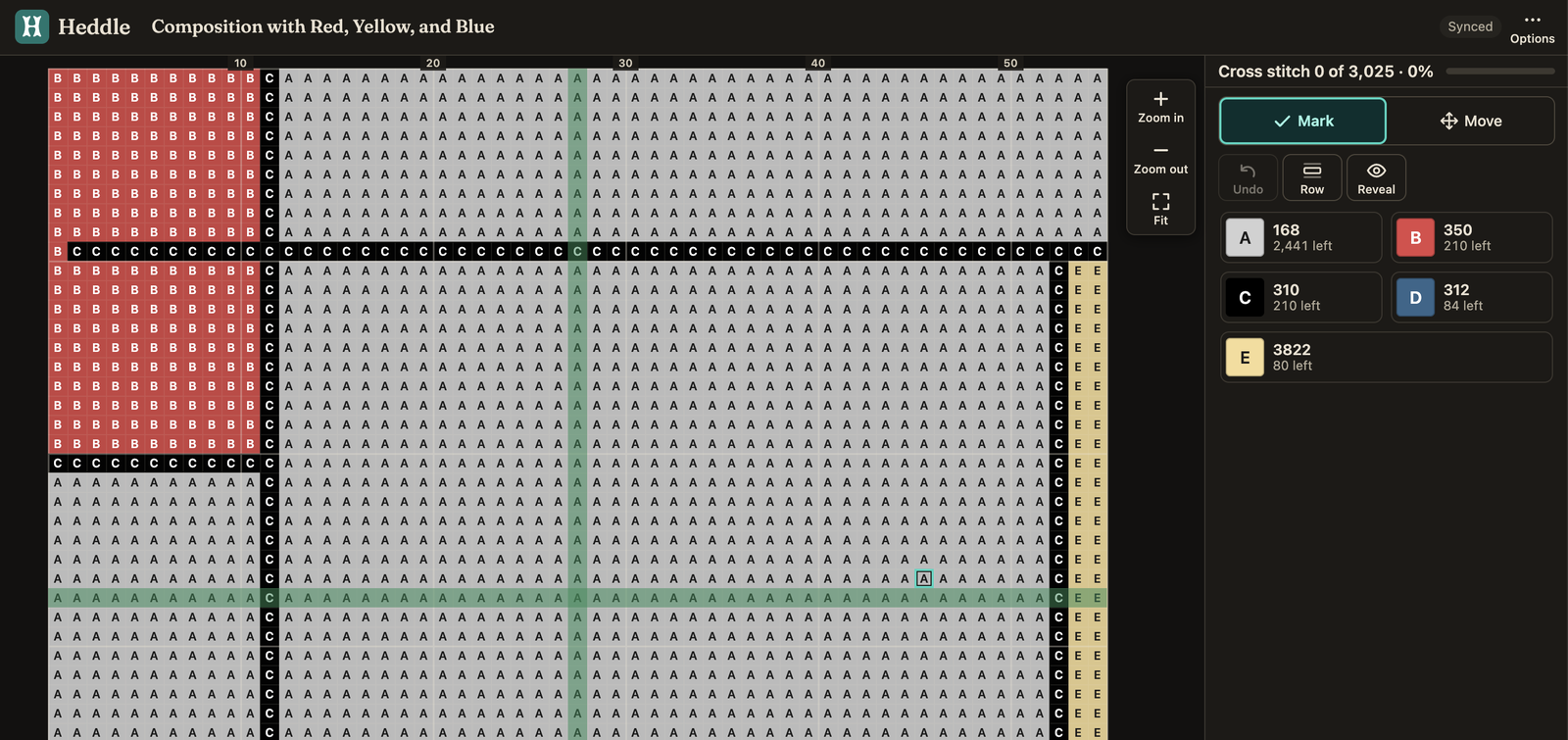
I’ll use the Mondrian pattern from my colour palette post as the example. It’s 55 × 55 stitches with only five colours, so it’s a friendly one to learn on.
Symbols and the key
Each square that needs a stitch has a symbol in it, and each symbol stands for one thread colour. The key (sometimes called the legend) lists every symbol with its thread number, usually DMC, so you know what to buy and which one to pick up.
| Symbol | DMC | Colour | Stitches |
|---|---|---|---|
| A | 168 | Pewter Very Light (the white) | 2,441 |
| B | 350 | Coral Medium (the red) | 210 |
| C | 310 | Black | 210 |
| D | 312 | Baby Blue Very Dark (the blue) | 84 |
| E | 3822 | Straw Light (the yellow) | 80 |
Colour charts and symbols-only charts
Some charts fill each square with the thread’s colour as well as the symbol, which lets you see the picture as you stitch. Others use symbols only, which is easier to print in black and white. In Heddle you can choose either when you export your chart as a PDF.
If you’re working from a colour chart, go by the symbol and the thread number rather than the colour on the page. Screens and printers never match the real thread exactly.
Bold lines, numbers and the centre arrows
The bold lines run every 10 squares, so you can count in blocks of 10 instead of counting squares one at a time. The numbers along the edges tell you how far along the chart you are.
Printed charts usually have small arrows in the middle of each edge. They meet at the centre of the design, and you can match them to the centre of your fabric (fold it in half both ways to find it). Heddle’s printed charts have them too, and Stitch view can show guide lines through the middle of the chart.
A common tip is to start at the centre and work outwards, which keeps the design centred and makes miscounting less likely.
Backstitch lines
A line drawn over the squares, joining two corners, is a backstitch. It’s a straight stitch used for outlines and fine detail that squares can’t show. It’s usually worked last, over the finished cross stitches. I used it in my iris pattern to outline the dragonfly’s wings, body and head. The Mondrian pattern doesn’t have any, which is one reason it’s good for a first project.
Half stitches and French knots
You’ll meet these less often. A half stitch is a single diagonal, and on a chart it’s shown as a small symbol in half of the square. A French knot is a little knot worked in thread, and it’s usually marked with a small circle or dot rather than a full square.
Charts that run over several pages
A big pattern is split over several pages. Heddle’s printed charts overlap by 2 stitches where one page meets the next, and they say “continues on page N” and “continued from page N” so you can line them up.
Paper charts and digital charts
You’ll find charts in two forms, and everything above applies to both.
Paper charts come in kits, magazines and books, or you print them from a PDF. They’re easy to spread out so you can see the whole design at once, you can mark them up with a pencil or highlighter, and there’s no battery to run down. The symbols can be small, though, and you have to keep track of your progress by hand. The first time I did cross stitch, I used a printed pattern and marked off every stitch with a red felt pen, which ended with red ink all over my fingers.
Digital charts are viewed on a phone, tablet or computer. You can zoom in on small symbols, and some apps let you tick off stitches as you go. In Heddle’s Stitch view you can also focus on one thread at a time and see how many stitches you’ve done. A phone screen shows less of the chart at once than a page does, and you can’t scribble on it.
You don’t have to pick one. A printout shows you the whole design, and a screen lets you zoom in. If you do print, Heddle lets you choose A4 or US Letter, colour or symbols, and how many stitches fit on each page. I prefer digital charts like Stitch view, so I can keep the chart on my phone and avoid having to put my stitching down to mark off the stitches.
Keeping your place
On a long pattern it’s easy to lose your place. On paper you can tick off or highlight finished areas, and in Heddle you can tap squares in Stitch view as you go. I wrote about how stitch tracking works.
You can look at the Mondrian chart yourself below. To plan a project, the fabric size calculator and floss estimator work out how much fabric and thread you’ll need.
Happy stitching!